

A Complying Written Arrangement (CWA) is the formal agreement that confirms a child has started care and enables access to the Child Care Subsidy for eligible sessions. The updated process introduced on 21 October 2022 automatically sends enrolment notices once a CCS enrolment is completed on the Government Enrolment page. Xplor Education supports this flow through Office and Home, with automated emails, faster approvals and earlier error detection. CWAs can be updated through the Master Roll Screen or the Government enrolment tab, helping reduce backdating and missed entitlements. Centralised records and built-in checks make compliance easier for services and clearer for families.
A Complying Written Arrangement (CWA), the formal agreement between a licensed Early Childhood Education and Care (ECEC) provider and a parent or guardian, outlines the provision of childcare services in return for fees. Once a parent/guardian signs a CWA, it signifies that the child has officially commenced care with the government. Additionally, completing a CWA makes the child eligible for the Child Care Subsidy (CCS) for applicable sessions.
Crucial steps for parents/guardians
Before starting care at an ECEC service, parents or guardians should complete their Centrelink Claim and Activity Test via MyGov.

Service providers and their clients enter into CWAs when the service charges fees that are eligible for government subsidies, enabling families to pay only their gap fee out of pocket. A few considerations:
- Families will only be eligible for a subsidised fee for sessions covered through their CWA.
- A family’s CWA will automatically cease if their child does not attend a service for 14 consecutive weeks.
- A family’s entitlements will cease if their child does not attend care for 26 consecutive weeks.
You can update CCS eligibility at any time through the CWA. In Xplor Education’s Office platform, you can update this on the Master Roll Screen for any change to their booking pattern, or in the Government enrolment tab for all other updates.
For approval via the MyGov website, the CWA must include:
- Child and Parent/Guardian Full Name, CRN and DOB
- The start date of the agreement
- Session details, including days, start & end times and fees
- Whether care is provided on a casual, weekly or fortnightly basis
What’s changed with the Complying Written Arrangement (CWA) process?
On 21 October 2022, the CWA process changed. Previously, an enrolment notice couldn’t be submitted unless a parent/guardian signed a CWA agreement through the Home app. Now, an enrolment notice will automatically be sent upon successful completion of a new CCS enrolment (CWA) on the Government Enrolment page.
You still need to generate a CWA in parallel for caregiver approval via the Xplor Education Home app.

Discover the perfect duo for boosting and streamlining family engagement
Automated email communications with parents/guardians will facilitate the CCS enrolment procedure.
Throughout the CCS enrolment (CWA) process, primary caregivers will receive four types of automated emails with instructions on the next step to take. When each of these conditions is met, an email will be sent out immediately.
- The CCS enrolment (CWA) notice is ‘Pending’ or ‘Pending Eligibility’
- The CWA agreement has not been signed for more than 48 hours
- The CWA agreement has been revised in both Office and Home
- The CWA agreement is approved
What does this mean for you?
Faster Complying Written Arrangement (CWA) enrolment processing with fewer errors
Submitting a CCS enrolment (CWA) for a child changes its status to ‘Pending’ or ‘Pending Eligibility.’ To simplify the CCS enrolment process, primary carers will first sign their CWA through MyGov. They can then navigate through to Home to finalise. If they don’t do this immediately, the primary carer will get an email reminder within 48 hours.
The redesigned CWA flow eliminates the ‘Draft’ status, but this doesn’t affect draft CCS enrolments. Users can also create a new CWA enrolment to override their previous draft if they wish.
Previously, errors appeared only after the parent/guardian signed the CWA in the Home app. But now, any errors are immediately identified, preventing the CCS enrolment from being created and enabling admins to resolve the issue quickly. You can leverage Xplor Education’s features for automated Complying Written Arrangements to reduce the likelihood of errors and ensure your documentation aligns with regulatory requirements.

With Xplor Education, you can enjoy a streamlined Complying Written Arrangement (CWA) process. This enables you to save time on administrative tasks related to compliance and documentation. You’ll also benefit from an intuitive and user-friendly interface that simplifies the CWA process. We designed the Xplor Education platform to enhance the user experience.
Lessen backdating
Office users can choose CCS enrolment (CWA) start dates (current or past dates only).
CCS enrolling (CWA) notification start date is no longer based on a parent/guardian’s approval (in the Home app). Previously, parents/guardians approved the CWA after the arrangement start date, which required admins to manually backdate the start date.
Proactive CCS enrolments
If the new CCS enrolment fails to submit to the government, you’ll see an error message (e.g., Individual CRN and DOB do not exist).
Previously, error notifications didn’t appear until a parent/guardian stopped receiving CCS payments.
Smoother enrolment experience for parents/guardians
Parents/guardians remain updated throughout the CWA process via automated emails, which include instructions and links to CCS and Office support resources for additional help.
There are no items to action, and your service doesn’t need to take any further action. This feature will automatically update in Office.
Office stores your data securely in a centralised repository for easy access.
Centralised documentation and storage
Enjoy the assurance of data security with Xplor Education’s platform, ensuring the protection of sensitive information within Complying Written Arrangements. Xplor Education prioritises the security and confidentiality of your documentation. In addition, you can access a centralised repository for all your compliance-related documentation. Easily retrieve and manage CWA records in one location, simplifying record-keeping and audit processes.
Significance of the change to the Complying Written Arrangement (CWA) process
This change eliminates several of the past roadblocks around the CWA process, such as:
- CCS enrolment (CWA) being a lengthy and tedious process
- Certain steps become lost between either parent or guardian
- Parents/guardians having trouble locating the CWA, and the two-step process posing a difficulty for them
- Backdating was unavailable to admins
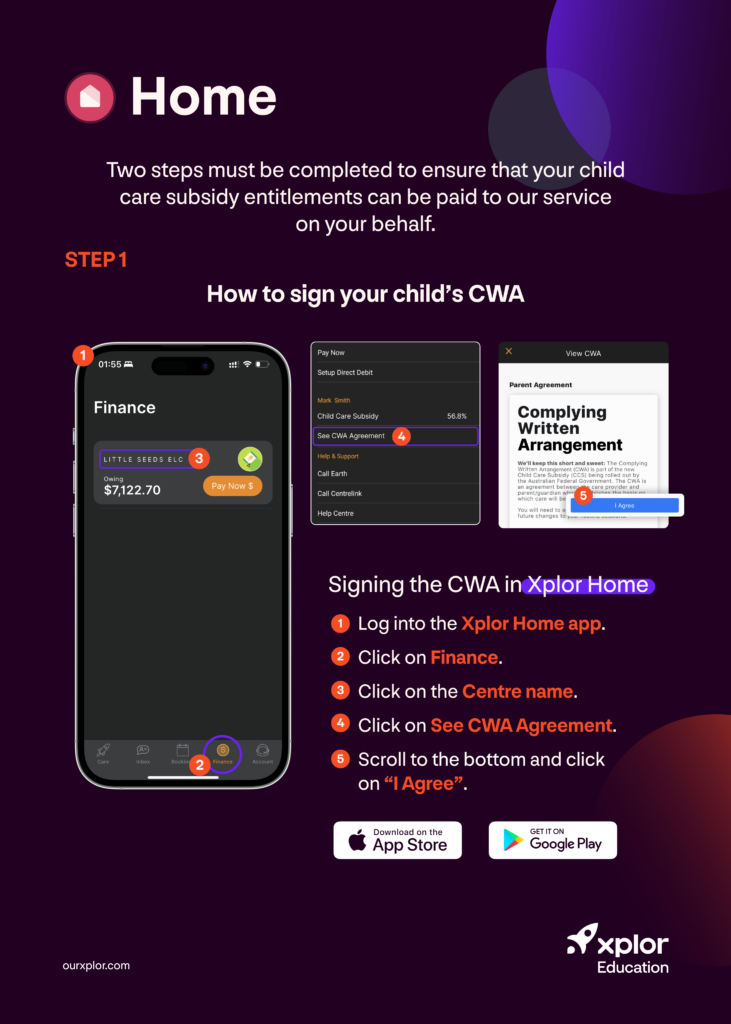
How can parents/guardians sign a Complying Written Arrangement (CWA) in the Home app?
Signing a CWA in Home is quick and straightforward. Please share this handy graphic with parents/guardians so they can follow the five easy steps to sign their CWA.
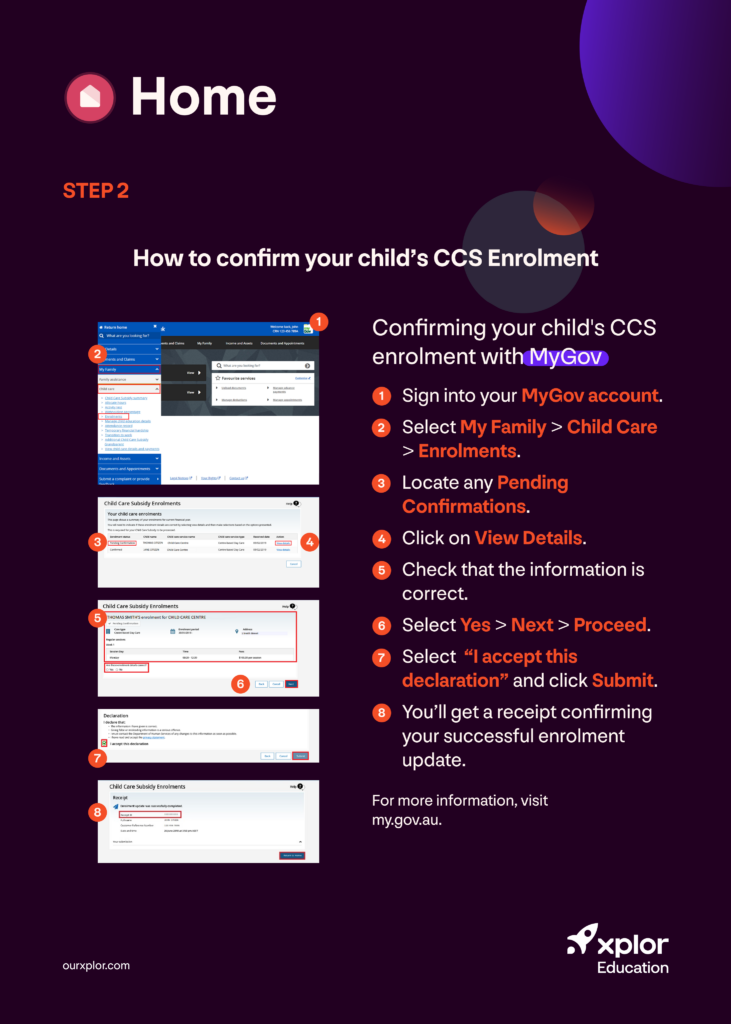
How can parents/guardians confirm their child’s CCS enrolment?
After they’ve signed a CWA, the second step is to confirm their child’s CCS enrolment. Again, this is a straightforward procedure when you know how. Parents/guardians can simply follow the eight steps in the graphic below to confirm their child’s CCS enrolment.
Complying Written Arrangement (CWA) support info
Please refer to this support article for further assistance on CWA approvals. If you have any questions or concerns about the new CWA process, you can contact the Xplor Support Team via support@myxplor.com, on (03) 8652 1963 (between 8 am–6 pm AEDT), through your Office setup or the chat icon on the Support page.
Experience the benefits of Xplor Education’s Complying Written Arrangement (CWA) process with streamlined administrative tasks, enhanced compliance accuracy and secure, centralised documentation management. To learn more about how Xplor Education can streamline administration at your service, contact us for a free demonstration.

You might also be interested in…




by Dean Comeau (Marketing Team Lead)
-
First published: 05 December 2022
Written by: Dean Comeau